
Software defined radio software allows you to receive, analyze, decode, and, with compatible hardware, transmit radio signals using a computer instead of relying entirely on traditional radio circuits. Whether you want to listen to shortwave broadcasts, explore amateur radio, monitor aviation communications, study wireless signals, or develop a custom radio system, the right software determines how easily you can work with your SDR hardware.
Several programs are available for Windows, Linux, and macOS. Some focus on straightforward radio listening, while others provide advanced signal processing, digital decoding, spectrum analysis, and tools for building custom communication systems. Popular choices include SDR++, SDR#, GQRX, SDRangel, and GNU Radio. Each serves a different purpose, so the best option depends on your hardware, operating system, and technical experience.
🎵 Similar Stations
This guide explains the main software options, their practical uses, the hardware requirements to consider, and how to get started without unnecessary configuration problems.
What Is Software Defined Radio Software?
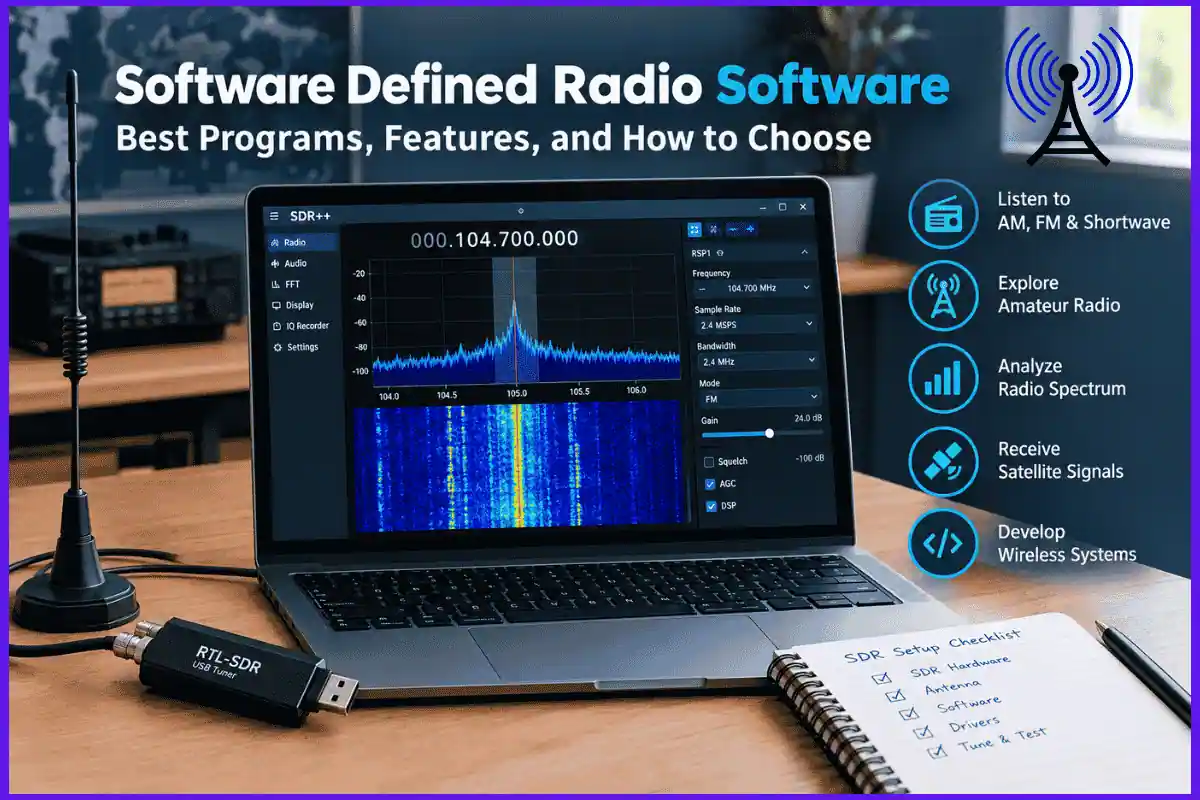
Software defined radio (SDR) software is an application or development framework that processes radio signals digitally. Instead of performing every radio function through dedicated electronic circuits, an SDR system uses software to handle tasks such as tuning, filtering, demodulation, and signal analysis.
A typical setup includes three components:
- SDR hardware: A USB receiver or radio transceiver that captures radio-frequency signals and converts them into digital samples.
- SDR software: The program that processes those samples and displays signals or converts them into audio and data.
- An antenna: The component that receives or transmits radio-frequency energy, depending on the capabilities of the system.
For example, you can connect a compatible USB SDR receiver to a computer, launch an application such as SDR++, select a frequency, and view nearby signals on a spectrum display. If the signal uses a supported modulation method, the software may be able to demodulate it so you can listen to the audio.
Software does not eliminate the need for suitable hardware. Your receiver’s frequency range, bandwidth, sensitivity, and supported drivers still determine what you can receive.
Best Software Defined Radio Software Options
The following programs cover the main SDR use cases, from beginner-friendly listening to advanced signal-processing development.

1. SDR++
Best for: General-purpose SDR listening
SDR++ is a free, open-source, cross-platform SDR application designed around a relatively lightweight interface. It supports multiple VFOs, a spectrum and waterfall display, and a range of radio devices through dedicated modules and SoapySDR. It is a strong starting point for users who want one receiver application across different desktop operating systems.
Official website: sdrpp.org

2. SDR#
Best for: Windows users and supported receiver hardware
SDR#, also known as SDRSharp, is a popular receiver application for Windows. It provides tuning and demodulation controls, spectrum visualization, and an ecosystem of extensions. It is worth considering if your receiver is supported and you prefer a Windows-focused workflow.
Check the current installation instructions and hardware compatibility before downloading.
Official website: airspy.com

3. GQRX
Best for: Linux and macOS receiving setups
GQRX is a free, open-source SDR receiver built with GNU Radio and the Qt graphical toolkit. It supports common analog modes, including AM, SSB, CW, and narrowband and wideband FM, along with frequency tuning, filtering, gain controls, spectrum analysis, and recording. Hardware compatibility depends on the available drivers and software build.
Official website: gqrx.dk

4. SDRangel
Best for: Advanced radio analysis and experimentation
SDRangel is intended for users who need more than basic receiver controls. Its capabilities include signal analysis, digital modulation and demodulation tools, mapping features, and transmit or receive workflows with compatible devices. It is particularly useful for technically demanding projects, although its larger feature set can take longer to learn.
Verify the particular modem, device, and operating-system support required for your project before installing it.
Project website: github.com/f4exb/sdrangel

5. GNU Radio
Best for: Engineers, researchers, students, and developers
GNU Radio is a free, open-source signal-processing toolkit rather than simply a conventional radio-listening application. It lets users connect processing blocks to create receivers, transmitters, demodulators, filters, and experimental communication systems. Projects can be developed using graphical flowgraphs and programming tools.
Official website: gnuradio.org
Software Defined Radio Software Comparison
Use this table to narrow your choices before downloading anything.
| Software | Best use | Main strength | Learning curve |
|---|---|---|---|
| SDR++ | General radio reception | Lightweight, cross-platform interface | Easy to moderate |
| SDR# | Windows-based reception | Receiver-focused workflow and extensions | Easy to moderate |
| GQRX | Desktop radio listening | Open-source receiver with spectrum tools | Easy to moderate |
| SDRangel | Advanced radio experiments | Multiple analysis and modem capabilities | Moderate to advanced |
| GNU Radio | Custom radio development | Flexible signal-processing building blocks | Advanced for complex projects |
These are practical starting points rather than a universal ranking. Actual performance depends on the SDR device, drivers, computer, and required features. Some programs also support particular operating systems or radio models better than others.
What Can You Do With SDR Software?
Software defined radio is useful for much more than listening to conventional FM broadcasts. Its applications range from everyday reception to research and wireless engineering.
1. Listen to AM, FM, and Shortwave Radio
A compatible receiver and application can help you explore local FM stations, AM broadcasts, amateur radio activity, and shortwave transmissions.
The available modes depend on the software and hardware. For example, receiving ordinary broadcast FM is different from receiving single-sideband (SSB) signals commonly used in amateur and shortwave radio.
If your main goal is listening, start with SDR++ or GQRX. You can learn the basic tuning and filtering controls before moving to more advanced software.
2. Explore Amateur Radio
Radio enthusiasts use SDR applications to examine amateur radio bands, identify signal activity, and receive supported modes.
Common features include:
- Frequency tuning and bandwidth selection.
- Adjustable receiver gain.
- Noise reduction and filtering options.
- Spectrum and waterfall displays.
- Audio recording and, in some applications, raw I/Q recording.
Some digital amateur radio modes require additional decoding software. Confirm that the application supports your intended mode or can pass the signal to a compatible external decoder.
3. Analyze the Radio Spectrum
Spectrum analysis displays signal strength across a range of frequencies. A waterfall display adds a time dimension, showing how signals change as time passes.
These visual tools help users identify occupied frequencies, compare signal levels, observe interference, and investigate unexpected transmissions.
However, a visible signal is not automatically identifiable. Several different systems can occupy nearby frequencies, and some signals cannot be understood from a spectrum display alone.
4. Receive Satellite Signals
SDR hardware can be used in projects involving weather satellites, amateur radio satellites, and other supported satellite transmissions.
A typical workflow may require:
- A receiver that covers the relevant frequency.
- A suitable antenna and, where necessary, a tracking setup.
- Software for tuning and recording.
- A decoder that understands the satellite’s transmission format.
Receiving and decoding are separate tasks. A general SDR application may capture a signal without being able to interpret the transmitted data itself.
5. Develop and Test Wireless Systems
Developers and researchers can use GNU Radio to build experimental receivers, transmitters, filters, modulation systems, and communication pipelines. Its reusable processing blocks make it possible to change a signal-processing design without rebuilding an entire radio in hardware.
This approach is useful for university projects, laboratory testing, protocol research, and prototyping wireless communications.
Also Read: Best Free Broadcasting Software for Online Radio
Hardware Requirements for SDR Software
Before choosing a program, confirm that your hardware supports the frequencies and signal types you intend to use.
SDR Receiver or Transceiver
An entry-level USB receiver is enough for many receiving experiments. More advanced devices may offer wider bandwidth, better dynamic range, improved sensitivity, or transmission capabilities.
Check these specifications:
- Frequency range: Does the device cover your target band?
- Instantaneous bandwidth: Can it capture the portion of spectrum you want to inspect?
- Supported connection: Does it use USB, Ethernet, or another interface?
- Driver availability: Can your operating system communicate with it?
- Transmit capability: Does the device actually support transmission, if required?
Do not assume every SDR can transmit. Many inexpensive USB dongles are receive-only devices.
Antenna
The antenna strongly affects what you can receive. An antenna designed for VHF may perform poorly for HF signals, while an unsuitable indoor antenna may struggle even when the software and receiver are working correctly.
Choose an antenna for the target frequency range and installation environment. Also consider interference from nearby electronics, cables, and other radio equipment.
Computer
Basic receiver applications can run on modest computers, but demanding signal-processing workflows require more resources.
A faster processor can help with wideband signal processing and multiple simultaneous decoders. Adequate USB bandwidth, memory, and storage are also important when capturing large amounts of raw I/Q data.
For example, an eight-bit complex I/Q stream sampled at 2.4 million samples per second produces approximately 4.8 MB per second of uncompressed data when each I and Q component occupies one byte. That is roughly 17.3 GB per hour before file overhead. Actual storage requirements depend on sample format and recording settings.
How to Install and Configure SDR Software
The exact installation process varies by application, but the following steps provide a practical starting workflow.
Step 1: Identify your SDR hardware
Find the manufacturer, model, supported frequency range, and recommended driver. Check the software’s device compatibility list before installing it.
Step 2: Download the application from its official source
Use the developer’s website or official project repository. Avoid unofficial installers that bundle unrelated programs or outdated drivers.
Step 3: Install the required driver
Follow the hardware manufacturer’s instructions. Some devices need a separate driver, device-access permission, or a compatible SDR interface library.
Step 4: Select the receiver and tune a known signal
Connect the antenna, select the correct device, choose a suitable frequency, and begin with a signal that is known to be available in your area.
Step 5: Adjust gain, demodulation, and filtering
Select the appropriate mode and bandwidth. Increase gain carefully; excessive gain can overload the receiver and make reception worse rather than better.
Step 6: Save a working configuration
Once reception is stable, save your device settings and frequency configuration if the application supports it. This makes future sessions easier to reproduce.
SDR Software for Different Operating Systems
Operating-system compatibility is an important part of choosing a program.
Windows
Windows users can consider SDR++, SDR#, SDRangel, and other receiver applications that support their hardware. GNU Radio is also available for Windows through supported installation methods.
Before installing a driver, check whether the SDR application expects a particular driver backend. Two programs may support the same receiver but require different configurations.
Linux
Linux is suitable for both SDR listening and development. SDR++, GQRX, and GNU Radio are useful options, depending on whether the goal is reception or custom signal processing.
If a receiver is not detected, check USB permissions, device rules, required libraries, and whether another application is already using the device. The GQRX project documentation identifies driver and device-access configuration as common troubleshooting areas.
macOS
SDR++ and GQRX are worth investigating for macOS systems, along with other applications that offer compatible builds. GNU Radio can also be used for development.
Check the software’s current release notes and installation instructions for your macOS version, processor architecture, and SDR model. Hardware support on one operating system does not guarantee identical support on another.
Common SDR Software Problems and How to Fix Them
A receiver that fails to produce audio or display a useful signal is not necessarily defective. Work through these checks before replacing your hardware.
| Problem | Likely cause | What to try |
|---|---|---|
| SDR device is not detected | Missing driver or access permissions | Recheck drivers, USB access, and device selection |
| Waterfall shows little activity | Poor antenna, incorrect frequency, or low gain | Test a known local signal and adjust gain |
| Audio is distorted | Excessive gain or incorrect demodulation settings | Reduce gain and verify the selected mode |
| Signal appears but cannot be decoded | Unsupported protocol or missing decoder | Identify the modulation and use a compatible decoder |
| Audio cuts out | USB bandwidth, CPU load, or buffer issues | Reduce sample rate and close unnecessary applications |
| Receiver overloads | Strong nearby signals or excessive gain | Reduce gain and consider suitable RF filtering |
Why Gain Settings Matter
Gain controls how strongly the receiver amplifies incoming signals. Increasing it may reveal weak signals, but too much gain can overload the receiver when strong signals are present.
Start with a moderate setting and observe the spectrum. If the display becomes saturated or signals appear distorted, lower the gain and test again. The best setting depends on the receiver, antenna, and local radio environment.
Why Driver Compatibility Matters
SDR software communicates with hardware through drivers and device interfaces. A program may support a receiver in principle but fail to recognize it because the necessary driver is missing or incompatible.
Check the official documentation for your particular receiver model rather than assuming that a driver recommended for another SDR will work.
Is Software Defined Radio Software Free?
Many popular SDR applications are free to download, including SDR++, GQRX, and GNU Radio. However, free software does not mean that the entire setup has no cost.
You may still need to purchase an SDR receiver, antenna, cables, filters, or other accessories. Some commercial or specialist tools may also have licensing conditions that matter for business use.
Before installing an application, review its license and distribution terms, especially if you plan to modify the software, redistribute it, or use it commercially.
Is SDR Software Safe and Legal to Use?
Downloading SDR software from an official project website or repository is a sensible security practice. Keep your operating system and drivers updated, and avoid running unfamiliar scripts or installers with administrator privileges unless necessary.
Radio regulations depend on your country and the type of activity involved. Receiving, recording, decoding, and transmitting may be subject to different rules. Some communications are encrypted, restricted, or legally protected, and you should respect those restrictions.
Transmission requires particular care. Use hardware that explicitly supports transmitting, stay within authorized frequency and power limits, and obtain any required license or permission. A software application’s ability to generate a signal does not establish that transmitting it is lawful.
Frequently Asked Questions
Which software defined radio software is best for beginners?
SDR++ is a strong starting point for users who want a general-purpose receiver with cross-platform support. GQRX is another option for Linux and macOS users. The best choice depends on your hardware and operating system.
Can I use SDR software without an SDR device?
Some tools, including GNU Radio, can simulate or process generated and recorded signals without a physical radio connected. However, live over-the-air reception requires compatible receiving hardware and an antenna.
Can SDR software receive FM radio?
Yes. A compatible SDR receiver and application can receive broadcast FM signals when the frequency is within the device’s supported range and the software provides the appropriate demodulation mode.
Can SDR software decode digital signals?
Some applications include digital demodulators and decoders, while others focus on capturing and displaying signals. Certain protocols require additional software, specialized plugins, or a custom GNU Radio flowgraph.
Can I transmit using SDR software?
Yes, but only when the connected SDR hardware supports transmission and the software supports the device’s transmit functions. Many popular low-cost USB receivers are receive-only. Always comply with applicable radio regulations.
Which SDR software is best for advanced signal processing?
GNU Radio is a strong option for developing custom signal-processing systems. SDRangel is worth considering if you prefer an application with integrated analysis and modem features rather than building every processing chain yourself.
Does SDR software work on a laptop?
Yes. Many SDR applications work on laptops that meet their operating-system and hardware requirements. For demanding tasks, check processor performance, USB connectivity, and storage capacity before choosing your setup.
Final Thoughts
The best software defined radio software is the one that matches your actual radio project. For general listening and exploring signals, start with SDR++. For a receiver-focused setup, consider GQRX or SDR#. For advanced analysis, investigate SDRangel. If you want to design custom receivers or experiment with digital signal processing, GNU Radio provides a flexible development environment.
Before committing to a program, verify hardware compatibility, operating-system support, and the features you need. Begin with a known signal, learn the basic tuning and gain controls, and add specialized decoding tools only when your project requires them. This approach makes SDR easier to learn and helps you build a setup that can grow with your interests.
Note: We do not host any streaming content on our servers. All radio streams are links provided by official broadcasters for public use.
[…] ▶ Listen Live […]