
Internet radio station owners often reach the same crossroads sooner or later: should you use RadioBOSS or SAM Broadcaster?
Both platforms have been around for years, and both are widely used in online radio, community stations, hobby broadcasting, and small commercial streaming operations. But the experience of using them day-to-day can feel very different.
🎵 Similar Stations
Some broadcasters want rock-solid automation with minimal CPU usage. Others care more about advanced scheduling, voice tracking, encoder flexibility, or listener statistics. And for many smaller stations, price matters just as much as features.
This RadioBOSS vs SAM Broadcaster comparison breaks down the real-world differences between the two platforms so you can choose the one that actually fits your station setup, streaming goals, and technical comfort level.
What Are RadioBOSS and SAM Broadcaster?
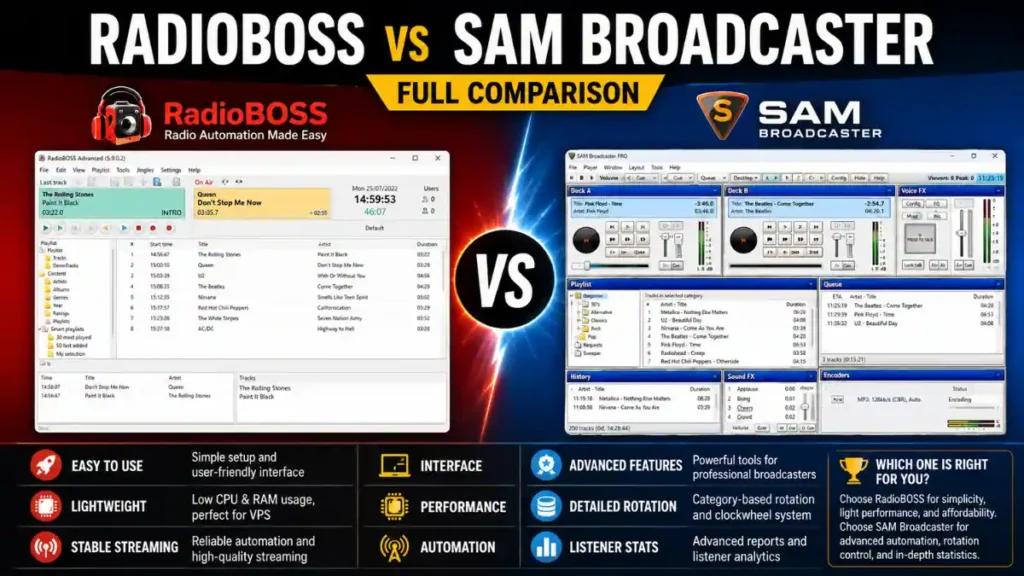
RadioBOSS
RadioBOSS is a Windows-based radio automation software platform designed for internet radio stations, FM stations, DJs, and music streaming operations.
It focuses heavily on:
- Stable automation
- Playlist scheduling
- Audio processing
- Multi-format streaming
- Lightweight performance
Many small and medium internet stations like RadioBOSS because it’s relatively easy to configure and doesn’t demand expensive hardware.
SAM Broadcaster
SAM Broadcaster is one of the oldest and most recognized internet radio automation platforms.
It’s known for:
- Advanced automation tools
- Listener statistics
- Built-in request systems
- Music rotation logic
- Deep customization
SAM became especially popular during the early internet radio boom because it combined automation, encoding, playlist management, and live broadcasting into one package.
Today, it still has a loyal user base, particularly among broadcasters who want detailed control over music categories and rotation rules.
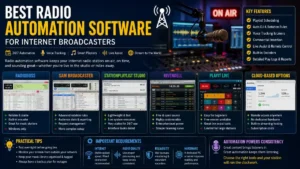
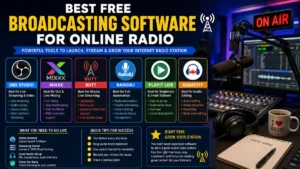
Also Read: Best Free Broadcasting Software for Online Radio
RadioBOSS vs SAM Broadcaster at a Glance
| Feature | RadioBOSS | SAM Broadcaster |
|---|---|---|
| Ease of Setup | Easier for beginners | More technical |
| System Performance | Lightweight | Heavier resource usage |
| Automation | Strong | Very advanced |
| Streaming Support | Excellent | Excellent |
| Audio Processing | Very good | Good |
| Database Complexity | Simpler | More complex |
| Listener Statistics | Basic | Advanced |
| Voice Tracking | Included | Included |
| Stability | Very stable | Stable but resource-heavy |
| Pricing Model | One-time purchase | Subscription or licensing options |
| Best For | Small/medium stations | Advanced format-driven stations |
Ease of Installation and Learning Curve
RadioBOSS Is Usually Easier for Beginners
One of the biggest reasons newer broadcasters choose RadioBOSS is the setup experience.
Most users can:
- Install the software
- Add music folders
- Configure streaming credentials
- Start broadcasting
within a relatively short time.
The interface feels more modern and less intimidating compared to older radio automation systems.
For hobby broadcasters or first-time internet station owners, that matters a lot.
SAM Broadcaster Has a Steeper Learning Curve
SAM Broadcaster can do a lot, but that flexibility comes with complexity.
New users often struggle with:
- Clockwheel setup
- Category rotations
- PAL scripting
- Database management
- Encoder configuration
For experienced broadcasters, those tools can be extremely powerful.
But beginners sometimes feel overwhelmed after installation.
A common real-world situation is someone launching a small online station and spending more time configuring rotation logic than actually broadcasting.
Audio Quality and Streaming Performance
RadioBOSS vs SAM Broadcaster Audio Performance
Audio quality depends partly on your encoder settings and streaming server, but the software itself still matters.
RadioBOSS Audio Handling
RadioBOSS performs very well with:
- MP3
- AAC
- OGG
- FLAC
- WAV
It also includes solid built-in audio processing tools.
Many internet broadcasters appreciate that they can achieve clean, consistent sound without needing expensive external processors.
RadioBOSS also tends to run efficiently on modest hardware, including low-cost Windows VPS servers.
That’s important for broadcasters trying to keep hosting costs manageable.
SAM Broadcaster Audio Handling
SAM Broadcaster also supports major streaming formats and encoder types.
However, many long-time users notice that SAM can become resource-intensive over time, especially with:
- Large music libraries
- Multiple encoders
- Complex rotations
- Long uptime sessions
Some broadcasters solve this by running SAM on dedicated systems with higher RAM and CPU availability.
Music Scheduling and Automation
SAM Broadcaster Is More Advanced for Rotation Logic
This is where SAM still shines.
Its category-based rotation system gives broadcasters deep control over:
- Artist separation
- Song repeat rules
- Genre balancing
- Clockwheel programming
- Scheduled events
Stations with structured programming formats — especially commercial-style stations — may prefer SAM for this reason.
For example:
A Top 40 station that needs precise artist separation rules every hour may benefit from SAM’s advanced logic.
RadioBOSS Focuses on Simplicity and Reliability
RadioBOSS automation is powerful too, but it’s generally easier to manage.
You can:
- Build playlists quickly
- Schedule shows
- Automate ads
- Insert station IDs
- Configure timed events
without digging through overly technical menus.
For many internet stations, that balance between power and simplicity is actually ideal.
Live DJ Features
Both platforms support live broadcasting.
RadioBOSS Live Broadcasting Features
RadioBOSS supports:
- Microphone input
- Live assist mode
- Voice tracking
- Crossfading
- Remote control tools
It works well for stations that mix automation with occasional live shows.
SAM Broadcaster Live Features
SAM Broadcaster includes:
- Live DJ switching
- Request management
- Queue systems
- Voice FX integration
- Event triggering
Some stations with multiple DJs prefer SAM because of its more extensive live management capabilities.
Resource Usage and Stability
RadioBOSS Is Usually Lighter
This is one of the most discussed differences in real-world broadcasting communities.
RadioBOSS typically:
- Uses less RAM
- Starts faster
- Runs smoothly on lower-end systems
- Handles long uptime periods well
That makes it attractive for:
- 24/7 internet stations
- VPS hosting
- Backup automation systems
SAM Broadcaster Can Become Heavy Over Time
SAM Broadcaster isn’t necessarily unstable, but it often consumes more resources.
Broadcasters sometimes report issues like:
- Slower performance after long sessions
- Database slowdowns
- Higher CPU usage
- More maintenance requirements
This becomes more noticeable on older PCs or budget cloud servers.
Streaming Server Compatibility
Both platforms support major streaming servers including:
- Shoutcast
- Icecast
- HTTPS streaming
They also support multiple encoders and simultaneous streaming outputs.
That means you can stream to:
- Your website player
- Mobile apps
- Smart speakers
- Streaming directories
at the same time.
Real-World Streaming Situation
A station owner might stream:
- 128 kbps AAC for desktop listeners
- 64 kbps AAC+ for mobile users
- MP3 fallback streams for older devices
Both RadioBOSS and SAM Broadcaster can handle this setup.
Podcasting and On-Demand Content
Neither platform is primarily podcast software, but both can support podcast-style workflows.
RadioBOSS for Podcast Production
RadioBOSS works reasonably well for:
- Pre-recorded shows
- Automated replay blocks
- Syndicated content scheduling
SAM Broadcaster for Podcast-Style Stations
SAM’s category system can help stations rotate archived shows and recurring segments more dynamically.
However, dedicated podcast platforms may still be better for serious podcast production.
Remote Broadcasting and VPN Considerations
Some internet radio stations use VPNs for:
- Remote DJ access
- Geo-restricted streaming management
- Secure remote administration
- Privacy protection on public networks
However, VPN usage can occasionally interfere with streaming connections.
Common VPN Streaming Problems
Broadcasters sometimes experience:
- Encoder disconnects
- Higher latency
- Buffering
- Blocked streaming ports
This usually happens because some VPN providers route traffic through congested servers or block specific broadcasting ports.
If you’re running either RadioBOSS or SAM Broadcaster remotely:
- Use low-latency VPN servers
- Avoid free VPN services
- Test encoder stability before live broadcasts
- Monitor upload bandwidth carefully
Pricing Differences
RadioBOSS Pricing
RadioBOSS is often viewed as more budget-friendly for small stations because it commonly uses a one-time purchase model.
That appeals to:
- Hobby broadcasters
- Community radio stations
- Small independent streamers
SAM Broadcaster Pricing
SAM Broadcaster pricing has evolved over the years and may involve subscription-style licensing depending on the edition.
Some broadcasters are comfortable with that because of the software’s advanced feature depth.
Others prefer avoiding ongoing costs.
Common Mistakes Broadcasters Make
Choosing Based Only on Features
A station owner may buy the most advanced software available and later realize they only use 20% of its capabilities.
Sometimes simpler software leads to fewer problems and smoother broadcasting.
Ignoring Hardware Requirements
Older PCs may struggle with heavy automation systems, especially if:
- Multiple encoders are running
- Audio processing is enabled
- Large databases are loaded
Poor Audio Processing Setup
Over-processing audio is common among internet broadcasters.
Too much compression or limiting can make streams sound harsh and fatiguing.
Not Testing Stream Stability
Always test:
- Encoder failover
- Internet upload speed
- Firewall settings
- Auto-reconnect behavior
before running a 24/7 station.
Practical Tips Before Choosing
Choose RadioBOSS If You Want:
- Easier setup
- Lightweight performance
- Stable automation
- Lower system requirements
- Simpler workflow
Choose SAM Broadcaster If You Want:
- Advanced rotation logic
- Deep category control
- Extensive scheduling customization
- More traditional commercial-style automation tools
Consider Your Actual Station Size
A small hobby station with 500 songs has very different needs compared to a structured commercial-style internet station running thousands of tracks and scheduled programming blocks.
Buying based on your real workflow matters more than buying based on reputation alone.
Important Technical Requirements
Before running either platform seriously, make sure you have:
Reliable Internet Upload Speed
For stable streaming:
- 128 kbps stream = minimum stable upload margin above 128 kbps
- Multiple encoders require significantly more bandwidth
Always leave bandwidth headroom.
Proper Audio File Management
Keep:
- Consistent bitrate formats
- Clean metadata
- Proper loudness normalization
Messy audio libraries create automation problems quickly.
Backup Systems
Professional broadcasters usually maintain:
- Backup playlists
- Backup encoders
- Secondary streaming servers
- UPS battery backups
Even small internet stations benefit from basic redundancy.
FAQ
Is RadioBOSS better than SAM Broadcaster?
It depends on your goals.
RadioBOSS is often better for users who want simpler setup, lower resource usage, and reliable automation.
SAM Broadcaster may be better for stations needing advanced music rotation and deeper scheduling logic.
Which software is easier for beginners?
RadioBOSS is generally easier for beginners.
Its interface and workflow are more approachable for first-time internet broadcasters.
Does SAM Broadcaster use more system resources?
In many real-world setups, yes.
SAM Broadcaster tends to consume more RAM and CPU resources than RadioBOSS, especially with large music libraries.
Can both platforms stream to Shoutcast and Icecast?
Yes.
Both support major streaming server platforms including Shoutcast and Icecast.
Which software is better for 24/7 internet radio?
Both can run 24/7 stations successfully, but many broadcasters prefer RadioBOSS for lightweight long-term stability.
Can I use either software on a VPS server?
Yes, although RadioBOSS is often easier to run on lower-cost VPS environments due to lighter resource usage.
Final Thoughts
The RadioBOSS vs SAM Broadcaster debate really comes down to workflow preference and station complexity.
RadioBOSS focuses on efficiency, simplicity, and stable automation. It’s often the better fit for smaller internet stations, independent broadcasters, and users who want dependable broadcasting without excessive setup headaches.
SAM Broadcaster still offers some of the deepest automation and rotation tools available in internet radio software. For experienced broadcasters running highly formatted stations, those advanced capabilities can absolutely be valuable.
The important thing is choosing software that matches your actual broadcasting style — not just the longest feature list.
A stable station with clean audio and reliable uptime matters far more to listeners than complicated backend automation they’ll never see.
Also Read: Best Radio Automation Software for Internet Broadcasters
Note: We do not host any streaming content on our servers. All radio streams are links provided by official broadcasters for public use.