
Running an internet radio station sounds simple until you’re the one managing playlists at 2 AM, fixing dead air problems, scheduling commercials, and trying to keep audio levels consistent across hundreds of tracks.
That’s where good radio automation software becomes essential.
🎵 Similar Stations
Whether you operate a small hobby station, a 24/7 online FM stream, a college radio channel, or a growing commercial internet station, automation software helps keep your broadcast running smoothly when nobody is sitting behind the microphone.
Modern radio automation platforms can handle:
- Music scheduling
- Live assist broadcasting
- Voice tracking
- Commercial insertion
- Stream encoding
- Remote broadcasting
- Podcast integration
- Auto-DJ features
- Metadata updates
- Multi-format audio libraries
But not every platform works well for every broadcaster.
Some are designed for professional terrestrial radio stations with expensive hardware setups. Others are built specifically for internet broadcasters who need affordable cloud-based automation.
This guide breaks down the best options realistically, including what works well, what causes problems, and which software fits different types of broadcasters.
What Is Radio Automation Software?
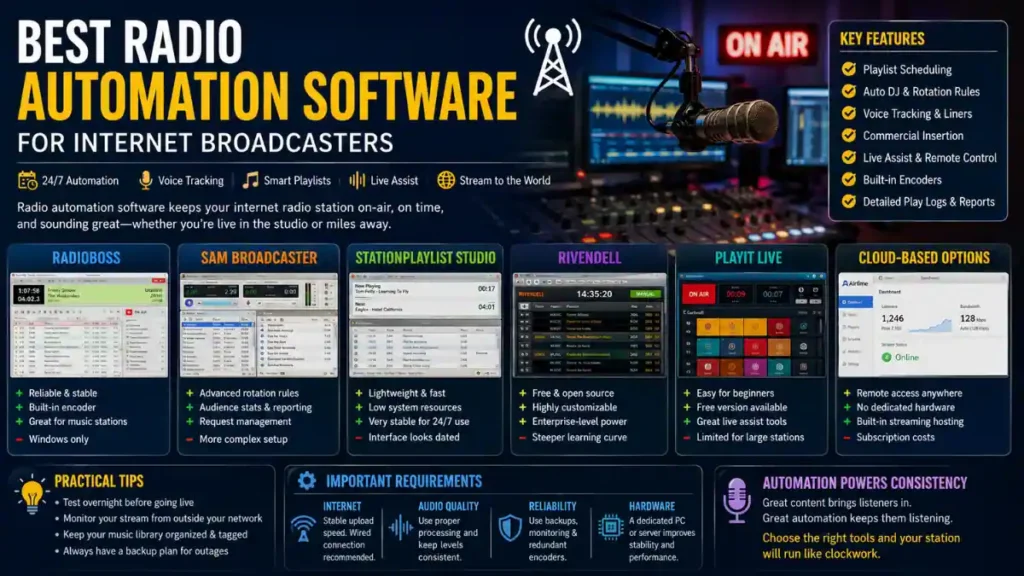
Radio automation software is the system that manages audio playback and scheduling for a radio station.
Instead of manually playing every song or advertisement, the software automatically handles programming based on playlists, rotations, and scheduling rules.
For internet broadcasters, automation software often becomes the “virtual DJ” that keeps the station live around the clock.
A typical setup may include:
| Feature | Purpose |
|---|---|
| Playlist scheduling | Organizes music rotation |
| Auto DJ | Plays content automatically |
| Voice tracking | Inserts prerecorded host segments |
| Stream encoder | Sends audio to streaming servers |
| Cart system | Stores jingles, ads, promos |
| Logging tools | Tracks playback history |
| Remote access | Allows cloud or off-site control |
For many small broadcasters, automation is the difference between running a stable station and constantly troubleshooting crashes or dead air.
Why Internet Broadcasters Need Reliable Automation
Traditional FM stations usually have dedicated studios and engineering teams.
Internet broadcasters often don’t.
A solo broadcaster might handle:
- Music programming
- Streaming servers
- Audio processing
- Social media
- Podcast editing
- Sponsorships
- Technical support
That’s a lot for one person.
Reliable automation software reduces manual work and prevents common problems like:
- Silence during unattended hours
- Duplicate song rotations
- Incorrect metadata
- Audio clipping
- Inconsistent commercial playback
- Stream interruptions
If your stream goes offline overnight because a playlist failed, listeners may not come back.
Consistency matters more than many new broadcasters realize.
Best Radio Automation Software for Internet Broadcasters
RadioBOSS


7
RadioBOSS has become one of the most popular choices for internet radio operators because it balances affordability with professional-level features.
It works especially well for:
- Small commercial stations
- Hobby broadcasters
- Online music stations
- Community radio projects
Strengths
- Stable long-term playback
- Built-in encoder support
- Voice tracking tools
- Good music rotation controls
- Affordable licensing
- Easy learning curve
Common Real-World Use Case
Many small broadcasters run RadioBOSS on a dedicated Windows mini PC connected directly to a streaming server. Some stations leave it running continuously for months with minimal intervention.
Downsides
- Windows-only
- Interface feels slightly dated
- Advanced scheduling can take time to learn
For many internet broadcasters, though, reliability matters more than appearance.
SAM Broadcaster


4
SAM Broadcaster Official Website
SAM Broadcaster has been around for years and still powers many internet radio stations worldwide.
It’s particularly known for:
- Advanced rotation logic
- Large music libraries
- Listener statistics
- Integrated request systems
Best For
- Stations with large music catalogs
- Internet stations with active listener requests
- Broadcasters wanting detailed playback control
Common Complaints
Some users report:
- Higher system resource usage
- More complicated setup
- Occasional database maintenance issues
New broadcasters sometimes underestimate how much initial configuration SAM requires.
Still, experienced operators often appreciate the flexibility.
StationPlaylist Studio


4
StationPlaylist Official Website
StationPlaylist has earned a strong reputation for stability.
It’s commonly used by:
- Community radio stations
- Religious broadcasters
- Small online stations
- Talk radio streams
Why Broadcasters Like It
- Extremely lightweight
- Low CPU usage
- Stable unattended operation
- Good live assist features
Some broadcasters run older PCs exclusively because StationPlaylist performs well even on modest hardware.
Potential Drawbacks
The interface feels technical compared to newer cloud-based platforms.
But many experienced broadcasters actually prefer that simplicity because fewer visual effects usually means fewer crashes.
Rivendell


7
Rivendell is a professional open-source radio automation platform built primarily for Linux environments.
It’s heavily used in:
- Public radio
- Educational stations
- Nonprofit broadcasters
- Engineering-focused environments
Advantages
- Free and open-source
- Highly customizable
- Enterprise-level capabilities
- Excellent for Linux servers
Challenges
Rivendell has a steeper learning curve than consumer-oriented automation software.
If you’re unfamiliar with Linux administration, setup can become frustrating quickly.
However, technically experienced broadcasters often love the flexibility and long-term cost savings.
PlayIt Live


6
PlayIt Software Official Website
PlayIt Live is popular among beginners because the free version offers surprisingly strong functionality.
Good For
- New internet broadcasters
- School radio stations
- Small podcast streams
- Low-budget projects
Features
- Cart wall
- Live assist
- Event scheduling
- Voice tracking
- Remote item triggers
Realistic Limitation
Large commercial stations may eventually outgrow it, especially if they need more advanced music scheduling logic or enterprise integrations.
But for many startup internet stations, it’s a practical entry point.
Cloud-Based Radio Automation Platforms
Cloud radio automation has grown rapidly because broadcasters increasingly want remote control from anywhere.
Instead of maintaining studio PCs, cloud systems run from hosted servers.
Popular cloud-focused options include:
- Airtime Pro
- Radio.co
- Live365
- AzuraCast
Why Some Broadcasters Prefer Cloud Systems
- No dedicated studio computer required
- Easier remote management
- Built-in streaming hosting
- Simpler backups
- Lower hardware maintenance
But Cloud Systems Have Tradeoffs
Internet dependency becomes critical.
If your connection drops while managing live programming remotely, things can get messy fast.
Some broadcasters also dislike recurring subscription costs compared to one-time desktop software licenses.
Important Technical Requirements Before Choosing Software
Streaming Server Compatibility
Your automation software must work correctly with your streaming provider.
Common streaming technologies include:
- Icecast
- SHOUTcast
- WHIP streaming
- RTMP streaming
Always verify encoder compatibility before purchasing software.
Some beginners buy automation software first and only later discover it doesn’t integrate smoothly with their host.
Audio Processing Matters More Than Many Beginners Think
Poor audio processing ruins listener experience quickly.
Common problems include:
- Songs playing at different volumes
- Distorted bass
- Over-compression
- Harsh vocals
- Clipping during live DJ sessions
Good automation software helps manage loudness consistency, but many stations also use dedicated audio processors.
Popular processing tools include:
- Stereo Tool
- Breakaway Audio Enhancer
- Omnia processors
- DSP plugins
Even a great playlist sounds amateurish if levels constantly jump.
Internet Speed and Stability Requirements
A surprisingly common mistake is running a 24/7 station on unstable home internet.
For reliable broadcasting:
- Use wired Ethernet when possible
- Avoid overloaded Wi-Fi
- Monitor upload bandwidth
- Use backup power if possible
- Consider cloud failover streams
A broadcaster might have excellent software but still experience listener dropouts because of poor network stability.
Voice Tracking vs Live DJing
Modern radio automation software often supports voice tracking.
Voice tracking lets DJs prerecord segments between songs while making the station sound live.
This has become extremely common in internet broadcasting because:
- Small stations rarely have live hosts 24/7
- Time zones complicate scheduling
- Solo operators need flexibility
Good voice tracking can sound very natural.
Bad voice tracking sounds robotic and disconnected.
The difference usually comes down to pacing, music timing, and host personality.
Common Mistakes Internet Broadcasters Make
Choosing Software That’s Too Complex
Some new broadcasters buy enterprise-grade systems they don’t actually need.
Complicated software often creates:
- Configuration errors
- Dead air
- Playlist problems
- Encoder issues
Simple and stable usually beats feature overload.
Ignoring Backup Systems
Even professional broadcasters experience crashes.
Always maintain:
- Backup playlists
- Secondary encoders
- Redundant internet when possible
- Emergency audio loops
Dead air damages listener trust quickly.
Poor Music Organization
Large unorganized libraries become difficult to manage.
Use proper metadata tagging for:
- Artist names
- Song titles
- Genre categories
- Rotation rules
- Explicit content labels
Good organization dramatically improves automation quality.
Running Everything on One Computer
Many experienced broadcasters separate tasks across systems.
For example:
| Task | Device |
|---|---|
| Automation | Dedicated PC |
| Streaming encoder | Secondary PC or cloud server |
| Audio editing | Separate workstation |
| Monitoring | Mobile device or tablet |
This reduces the risk of total station failure.
Practical Tips for Better Internet Radio Automation
Keep Your Operating System Clean
Avoid using your automation PC for gaming, casual browsing, or unnecessary software installs.
Dedicated systems are usually more stable.
Test Overnight Playback
Before launching publicly, run your automation system continuously for at least 24–48 hours.
Many playlist or encoder issues only appear after extended operation.
Monitor Your Stream Remotely
Always listen from an external device occasionally.
Some broadcasters think their station is live because the software is playing locally, while the actual stream server disconnected hours earlier.
Use Consistent Audio Formats
Mixed audio formats can sometimes cause playback inconsistencies.
Many broadcasters standardize on:
- MP3 320 kbps
- AAC+
- WAV for jingles
- FLAC archives
Consistency helps avoid unexpected glitches.
AI Audio Tools and Modern Automation
AI tools are increasingly appearing inside radio workflows.
Some current uses include:
- AI voice generation for liners
- Automatic transcription
- Podcast summarization
- Audio cleanup
- Automated music categorization
But most serious broadcasters still prefer human programming decisions for music flow and station personality.
Automation helps operations.
It doesn’t replace good broadcasting instincts.
FAQ
What is the best radio automation software for beginners?
PlayIt Live and RadioBOSS are often beginner-friendly because they’re easier to configure than larger enterprise systems.
Can I run an internet radio station from home?
Yes, many broadcasters do. However, stable internet, reliable power, and proper stream monitoring are important for long-term reliability.
Is free radio automation software good enough?
Sometimes. Free software can work well for hobby stations or testing environments, but larger stations often need better scheduling, reliability, and support.
Do I need separate streaming hosting?
Usually yes.
Most automation software handles playback and encoding, while a separate streaming server distributes audio to listeners.
Can radio automation software broadcast podcasts too?
Yes. Many platforms allow scheduled podcast playback, prerecorded shows, and automated reruns.
Does radio automation software work on Mac?
Some solutions do, but many professional platforms primarily support Windows or Linux environments.
Mac users sometimes rely on cloud-based systems instead.
Final Thoughts
The best radio automation software depends less on flashy features and more on reliability, workflow, and how your station actually operates day to day.
A small online jazz station has very different needs than a commercial dance music stream running live DJs across multiple time zones.
For many internet broadcasters, the ideal setup is the one that:
- Prevents dead air
- Stays stable for long periods
- Simplifies scheduling
- Supports remote management
- Fits realistic budgets
Good automation should quietly keep your station running in the background so you can focus on programming, audience growth, and creating a better listening experience.
In internet broadcasting, consistency usually matters more than complexity.
Also Read: RadioBOSS vs SAM Broadcaster: Full Comparison
Note: We do not host any streaming content on our servers. All radio streams are links provided by official broadcasters for public use.