
Starting an online radio station used to require expensive studio equipment, dedicated servers, and commercial broadcasting systems. That’s no longer true.
Today, there’s a wide range of free broadcasting software available for internet radio DJs, hobby broadcasters, podcasters, churches, campus stations, and even small commercial streaming operations. Some free tools are surprisingly powerful, while others are better suited for beginners who simply want to get a live stream online without spending money upfront.
🎵 Similar Stations
The challenge is figuring out which software actually works reliably in real-world broadcasting situations.
Some programs are easy to use but lack automation. Others sound great but consume too many system resources. And a few free tools become frustrating once you start dealing with live callers, remote DJs, music scheduling, or unstable internet connections.
This guide breaks down the best free broadcasting software options for online radio in 2026, including what they do well, where they struggle, and which type of broadcaster they fit best.
Why Free Broadcasting Software Is Popular Again
A lot of internet radio broadcasters start small.
Maybe it’s:
- A local music station streaming from home
- A podcast network experimenting with live radio
- A hobby DJ station
- A sports talk stream
- A church broadcast
- A community-based online FM-style station
In many cases, broadcasters don’t need enterprise-level radio automation on day one. They need stable streaming, decent audio quality, microphone support, playlist management, and compatibility with services like:
- Icecast
- SHOUTcast
- Live365
- Radio.co
- AzuraCast
- Centova Cast
That’s where free broadcasting software becomes useful.
Modern free radio software can now handle:
- Live broadcasting
- Voice tracking
- Music playback
- Audio processing
- Microphone mixing
- Remote streaming
- Podcast-style live shows
- Basic automation
For many small stations, free software is enough for months or even years before upgrading.
What Good Free Broadcasting Software Should Include
Not all radio broadcasting software is designed the same way.
Some tools are built for live DJs. Others focus on automation or streaming reliability.
Before choosing software, look for these features:
Stable Audio Streaming
The software should maintain a reliable stream connection without frequent disconnects.
This matters even more if:
- Your internet upload speed fluctuates
- You broadcast from home Wi-Fi
- You stream long live shows
A stream dropping every 20 minutes quickly drives listeners away.
Support for Icecast and SHOUTcast
Most internet radio hosting providers still rely on:
- Icecast
- SHOUTcast
Good broadcasting software should connect easily using:
- Server address
- Port
- Password
- Stream mount point
Audio Quality Controls
Low bitrate audio can sound thin and distorted, especially for music stations.
Good software should allow control over:
- Bitrate
- Sample rate
- Stereo settings
- Audio compression
Many online stations stream comfortably at:
- 128 kbps AAC
- 192 kbps MP3
Microphone and Music Mixing
Radio broadcasting usually involves switching between:
- Music
- Microphones
- Sound effects
- Interviews
- Voice tracking
Software with proper mixing controls makes broadcasts sound more professional.
Automation Features
Even small stations eventually need automation.
Examples include:
- Overnight playlists
- Scheduled shows
- Auto-DJ support
- Rotating station IDs
Without automation, running a 24/7 station becomes exhausting.
Best Free Broadcasting Software for Online Radio
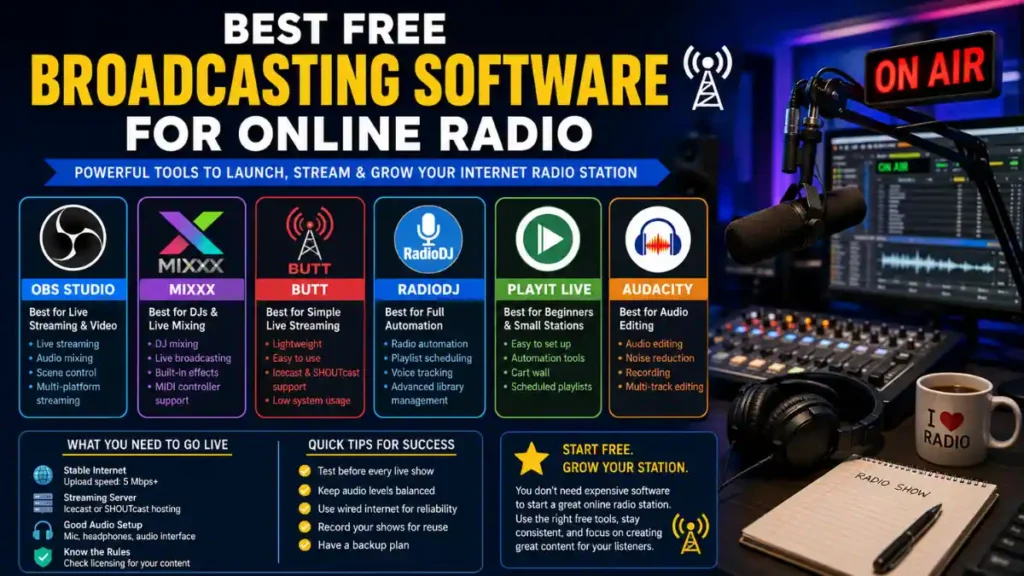
OBS Studio
Best For:
Live streaming radio shows with video support
OBS Studio became popular through gaming and video streaming, but many online radio broadcasters now use it for audio streaming too.
It works especially well for:
- Visual radio stations
- YouTube live radio
- Twitch radio streams
- Podcast livestreams
- Hybrid video/audio broadcasting
Advantages
- Completely free and open-source
- Excellent audio routing
- Supports multiple microphones
- Stable for long broadcasts
- Works on Windows, Mac, and Linux
Limitations
OBS isn’t traditional radio automation software.
You won’t get:
- Music scheduling
- Rotation systems
- Built-in radio automation
- Advanced playlist clocks
It’s mainly a live production tool.
Real-World Example
A small independent hip-hop station might use OBS to:
- Stream audio to Icecast
- Simultaneously broadcast video to YouTube
- Display live DJ webcams
- Show track information on screen
That setup works surprisingly well with minimal cost.
Mixxx
Best For:
Live DJs and music-focused internet radio stations
Mixxx is one of the strongest free broadcasting software platforms available for DJs.
It combines:
- DJ mixing
- Live broadcasting
- Audio processing
- Streaming output
Advantages
- Free and open-source
- Excellent DJ controls
- Built-in broadcasting support
- Supports microphones and external mixers
- Works with MIDI controllers
Limitations
Mixxx is less ideal for:
- Fully automated stations
- Complex scheduling
- 24/7 unattended broadcasting
It shines during live DJ sessions.
Why DJs Like It
Mixxx feels closer to professional DJ software than many free alternatives.
For internet radio DJs doing:
- Dance shows
- EDM streams
- Club-style radio
- Live mixing
…it’s one of the best no-cost options available.
BUTT (Broadcast Using This Tool)
Best For:
Simple live audio streaming
Despite the unusual name, BUTT is widely respected in internet radio circles.
It’s lightweight, simple, and reliable.
Advantages
- Extremely low system usage
- Very stable
- Easy Icecast and SHOUTcast setup
- Great for live talk radio
- Excellent for low-power computers
Limitations
BUTT is intentionally minimal.
You won’t get:
- Automation
- Advanced playlists
- Music scheduling
- Built-in sound processing
It’s mainly a clean audio encoder and streamer.
Real-World Use Case
Many broadcasters use BUTT alongside:
- Virtual audio cables
- External mixers
- Separate automation software
For example:
- Play music through another app
- Route audio into BUTT
- Stream directly to Icecast
This setup is common among community stations and hobby broadcasters.
RadioDJ
Best For:
Free radio automation
RadioDJ has developed a loyal following among internet radio station owners.
Unlike simple streaming encoders, RadioDJ focuses heavily on automation.
Advantages
- Professional-style automation
- Music rotation management
- Event scheduling
- Voice tracking support
- Playlist categories
- Cart wall functionality
Limitations
The setup process can overwhelm beginners.
It may require:
- Database configuration
- Audio library organization
- Initial scheduling setup
Some users also find the interface outdated compared to modern streaming software.
Why Small Stations Use It
For broadcasters trying to run a 24/7 online station without paying monthly automation fees, RadioDJ remains one of the strongest free options.
Especially for:
- Classic hits stations
- Talk radio
- Community stations
- Genre-focused internet radio
PlayIt Live Free
Best For:
Beginner-friendly radio automation
PlayIt Live offers a cleaner learning curve than many traditional radio automation tools.
Advantages
- Easier setup
- Cart wall support
- Scheduled playlists
- Live assist mode
- Voice tracking tools
Limitations
Some advanced features are locked behind paid versions.
Still, the free edition is very usable for small stations.
Good Fit For
- School radio
- Church streaming
- Local online stations
- Beginner broadcasters
It strikes a nice balance between simplicity and professional functionality.
Audacity
Best For:
Audio editing and pre-recorded content
Audacity isn’t live broadcasting software, but many radio stations rely on it daily.
Broadcasters use it for:
- Editing interviews
- Cleaning up podcast audio
- Recording voice tracks
- Creating station IDs
- Noise reduction
Advantages
- Free and widely trusted
- Easy waveform editing
- Strong plugin support
- Good for beginners
Limitations
Not designed for live broadcasting.
Think of it as a production tool rather than a streaming platform.
Comparing the Best Free Broadcasting Software
| Software | Best Use | Automation | Live Streaming | Beginner Friendly |
|---|---|---|---|---|
| OBS Studio | Live video radio | Limited | Excellent | Moderate |
| Mixxx | DJ radio shows | Basic | Excellent | Good |
| BUTT | Simple audio streaming | No | Excellent | Very Easy |
| RadioDJ | Full radio automation | Excellent | Good | Moderate |
| PlayIt Live | Small stations | Good | Good | Excellent |
| Audacity | Audio editing | No | No | Excellent |
Common Mistakes New Internet Radio Broadcasters Make
Using Wi-Fi for Critical Broadcasts
Wi-Fi instability causes:
- Audio dropouts
- Buffering
- Disconnects
Whenever possible, use wired Ethernet for live streaming.
Streaming at Excessively High Bitrates
Many beginners assume higher bitrate always means better quality.
But if listeners have weak mobile connections, extremely high bitrates can create buffering issues.
For most internet radio stations:
- 128 kbps AAC works well
- 192 kbps MP3 is usually enough
Ignoring Audio Levels
Poor volume balancing is common.
Problems include:
- Distorted microphones
- Music overpowering voices
- Clipping during live shows
Good audio processing matters more than many beginners realize.
Running Everything on One Weak Laptop
Broadcasting software, automation tools, browsers, webcams, and music libraries all consume resources.
Older computers may struggle during long live sessions.
Signs of overload include:
- Audio crackling
- Delayed playback
- Stream disconnects
- CPU spikes
Important Streaming Requirements Before Going Live
Internet Upload Speed
Upload speed matters more than download speed for broadcasters.
A stable stream usually requires:
- At least 5 Mbps upload for basic audio
- More for video-enhanced radio streams
Reliable Hosting Provider
Broadcasting software alone isn’t enough.
You also need:
- Streaming server hosting
- Listener bandwidth
- Reliable uptime
Many stations use:
- Icecast hosting
- SHOUTcast hosting
- Cloud radio panels
Audio Licensing
This is one of the biggest areas new broadcasters overlook.
If you stream copyrighted music publicly in the United States, licensing may apply through organizations like:
- ASCAP
- BMI
- SESAC
- SoundExchange
Requirements vary depending on:
- Station size
- Monetization
- Audience location
Ignoring licensing can create serious legal issues later.
Backup Plans
Experienced broadcasters prepare for technical failures.
Good backup strategies include:
- Secondary internet connections
- Backup playlists
- Cloud automation systems
- Emergency audio loops
Even major internet stations experience outages occasionally.
Practical Tips for Better Online Radio Broadcasting
Keep Your Audio Chain Simple
Overcomplicated setups create more failure points.
Start simple:
- Microphone
- Broadcasting software
- Stable encoder
- Reliable hosting
Add advanced tools later.
Test Before Every Live Show
Always test:
- Microphone levels
- Stream connection
- Audio routing
- Headphones
- Automation triggers
Five minutes of testing can prevent a two-hour disaster.
Use Headphones During Live Broadcasts
Speaker feedback ruins broadcasts quickly.
Closed-back headphones help monitor:
- Audio distortion
- Background noise
- Stream delay
- Caller quality
Record Your Broadcasts
Even if you’re live-only today, recordings become useful later for:
- Podcasts
- Social media clips
- Rebroadcasts
- Troubleshooting
Many successful internet radio stations repurpose live content into podcasts.
FAQ
What is the best free broadcasting software for online radio?
It depends on your goals.
OBS Studio works well for visual radio and livestreaming
Mixxx is excellent for DJs
RadioDJ is strong for automation
BUTT is great for simple live streaming
No single platform fits every station.
Can I run an internet radio station completely free?
Technically yes, but eventually most stations pay for:
Hosting
Licensing
Better automation
Audio processing
Cloud backups
Still, free software makes starting much easier.
Is free broadcasting software reliable enough for 24/7 radio?
Some options are surprisingly stable.
RadioDJ and PlayIt Live are commonly used for long-running stations. However, reliability also depends on:
Hardware
Internet stability
Stream hosting quality
Do I need special hardware for internet radio?
Not necessarily.
Many small stations begin with:
USB microphones
Standard PCs
Basic headphones
Simple audio interfaces
Professional studios usually come later.
What bitrate is best for online radio streaming?
For most stations:
128 kbps AAC offers good balance
192 kbps MP3 works well for music-heavy stations
Very high bitrates may hurt mobile listeners.
Final Thoughts
The best free broadcasting software is the one that fits your actual broadcasting style.
A live DJ station has different needs than:
- A talk radio stream
- A church broadcast
- A 24/7 automated music station
- A podcast livestream
That’s why many broadcasters eventually combine multiple tools together.
For example:
- RadioDJ for automation
- BUTT for encoding
- Audacity for editing
- OBS Studio for video streaming
The good news is that modern internet radio broadcasting no longer requires huge upfront costs.
With the right free broadcasting software, a stable internet connection, and realistic expectations, it’s entirely possible to launch a reliable online radio station from a home studio, spare bedroom, or small office.
And for many broadcasters, that’s exactly how successful stations begin.
Also Read: RadioBOSS vs SAM Broadcaster: Full Comparison
Note: We do not host any streaming content on our servers. All radio streams are links provided by official broadcasters for public use.